找回密码
 立即注册
搜索
查看: 33|回复: 0

破解路由器密码

[复制链接]

9

主题

4

回帖

105

积分

管理员

积分
105
发表于 2023-6-15 23:20:00 | 显示全部楼层 |阅读模式 来自 广东深圳
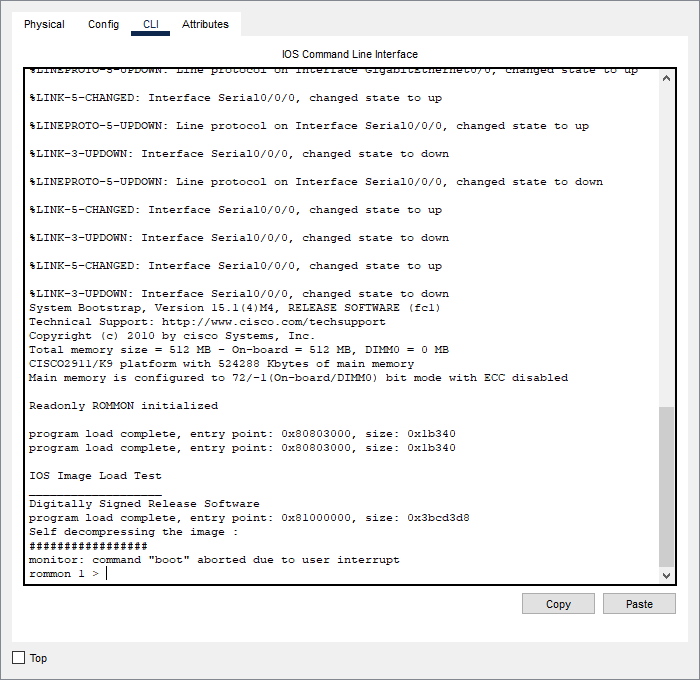
1、重启设备按Pause Break键进入监控模式

如果键盘上没有Pause Break键,可以按Ctrl+Win+O打开虚拟键盘,按Ctrl+ScrLk即可。


2、在监控模式下修改寄存器的值为0x2142


//若为0x2102标示设备启动时将加载配置;
//若为0x2142标示设备启动时不加载配置;
  1. rommon 1 > confreg 0x2142
  2. rommon 2 > reset
复制代码

执行完这两句命令后,设备会重启,不要做任何操作。


3、重启设备后,进入特权模式,将原有配置导出


  1. Would you like to enter the initial configuration dialog? [yes/no]: no

  2. Press RETURN to get started!

  3. Router>enable
  4. Router#copy startup-config running-config
  5. Destination filename [running-config]?

  6. 990 bytes copied in 0.416 secs (2379 bytes/sec)
  7. ISP2#
  8. %SYS-5-CONFIG_I: Configured from console by console

  9. ISP2#
复制代码

4、进入全局配置模式,修改密码


命令格式:enable secret 密码


  1. ISP2#conf t
  2. Enter configuration commands, one per line.  End with CNTL/Z.
  3. ISP2(config)#enable secret cisco
复制代码

5、修改寄存器值为0x2102,保存配置文件


  1. ISP2(config)#config-register 0x2102
  2. ISP2(config)#end
  3. ISP2#
  4. %SYS-5-CONFIG_I: Configured from console by console

  5. ISP2#write
  6. Building configuration...
  7. [OK]
  8. ISP2#
复制代码

6、重启设备后使用新设置的密码登录即可


  1. ISP2#reload
复制代码


站长提醒
请您在发表言论时,遵守当地法律法规。
您需要登录后才可以回帖 登录 | 立即注册

本版积分规则

Archiver|手机版|小黑屋|爱学习

GMT+8, 2025-12-16 05:25 , Processed in 0.020867 second(s), 20 queries .

Powered by Discuz!

Copyright ©2023 红旗在飘扬 , All Rights Reserved.

快速回复 返回顶部 返回列表